


Introduction
A profile picture often creates the very first impression on social media. Whether you’re trying to recognize a friend, verify a business account, or simply get a better look at someone’s display photo, you may want to see it in greater detail. Unfortunately, Instagram doesn’t allow users to tap and enlarge profile pictures directly within the app. That limitation has led many people to search for an instagram dp viewer that can display profile images in full size.
However, not every tool or method deserves your trust. Some services promise instant results while asking for unnecessary permissions, personal information, or account credentials. Others overwhelm visitors with misleading advertisements or risky downloads. Understanding how to safely view profile pictures is just as important as knowing which methods actually work.
This guide explains practical, secure ways to view profile images, highlights common risks to avoid, and shares useful tips that help protect your privacy while browsing online.
Why Instagram Doesn’t Allow Full-Size Profile Pictures
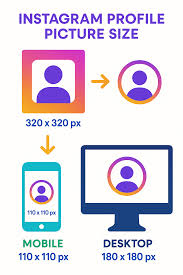
Instagram was designed around privacy and content sharing. While posts, stories, and reels can be viewed in different formats, profile photos remain intentionally small. This design choice helps reduce unauthorized copying while keeping user profiles clean and consistent.
Although users can zoom into photos posted on feeds, the profile image itself remains locked at a thumbnail size. As a result, people often look for alternative methods when they need a clearer view.
Common reasons include:
- Identifying someone with a similar username.
- Confirming the authenticity of a business account.
- Recognizing friends or family members.
- Checking whether an account appears genuine before interacting.
- Viewing branding elements such as logos more clearly.
These legitimate reasons explain why searches for an instagram dp viewer have become increasingly popular.
Safe Ways to View Profile Pictures
There are several approaches available, but they vary greatly in terms of security, effectiveness, and reliability.
| Method | Ease of Use | Privacy Risk | Best For |
|---|---|---|---|
| Built-in Instagram profile | Very Easy | Very Low | Quick identification |
| Screenshot and zoom | Easy | Very Low | Slight enlargement |
| Trusted profile viewing tools | Easy | Low | Full-size viewing |
| Browser inspection methods | Moderate | Low | Technical users |
| Unknown third-party apps | Easy | High | Not recommended |
The safest options never require your Instagram password or access to your account. If a service asks for login credentials simply to enlarge a public profile photo, it should immediately raise concerns.
What Makes a Safe Instagram DP Viewer?
Not every online service follows good privacy practices. Before using any tool, take a moment to evaluate how it handles your information.
A trustworthy instagram dp viewer typically has several important characteristics. It works without requesting your Instagram login, processes only publicly available information, and avoids forcing software downloads. It should also present information clearly without aggressive pop-ups or suspicious redirects.
Watch for these positive signs:
- No account login required.
- Simple and transparent interface.
- No mandatory downloads.
- Minimal advertising.
- Fast loading speeds.
- Clear privacy practices.
By contrast, services that request payment before showing basic information, demand unnecessary permissions, or continuously redirect users should be avoided altogether.
Privacy Risks You Should Never Ignore
Online convenience sometimes comes with hidden dangers. Many unsafe profile viewing websites are designed primarily to collect user data rather than provide useful functionality.
Some of the most common risks include credential theft, excessive tracking, malware downloads, and phishing attempts. Even if a website appears professional, appearances alone don’t guarantee safety.
Pay close attention to warning signs such as:
- Requests for your Instagram username and password.
- Pop-ups claiming your device is infected.
- Forced browser notifications.
- Automatic downloads.
- Endless verification steps.
- Promises to reveal private account content.
Remember that no legitimate viewing tool can bypass Instagram’s privacy settings. If an account is private, its profile information remains limited unless the owner approves your follow request.
Practical Situations Where Viewing a Larger Profile Picture Helps

Viewing a larger profile image isn’t always about curiosity. In many cases, it serves a practical purpose.
Imagine receiving a message from someone claiming to be an old classmate. Their username seems familiar, but the profile photo is too small to recognize. A clearer image can help confirm whether you’re communicating with the right person.
Businesses also benefit. Companies often verify influencers, affiliates, or customer profiles before starting collaborations. A larger logo or professional headshot may make identification much easier.
Recruiters, freelancers, and online buyers sometimes use publicly available profile images as one small part of verifying digital identities before beginning conversations.
These examples show why people frequently search for an instagram dp viewer, provided they use safe and ethical methods.
Common Misconceptions About Profile Picture Viewing
Several myths continue circulating online, causing confusion among users.
One common belief is that profile picture viewers can unlock private accounts. This is false. Public profile images are generally accessible, but private posts and personal content remain protected by Instagram’s privacy system.
Another misconception is that profile owners receive notifications whenever someone views or enlarges their profile picture. Instagram does not notify users when someone views a public profile photo.
Some also assume every online viewer stores personal browsing history. While trustworthy services generally process public information without requiring user accounts, privacy policies and browsing habits still matter. It’s always wise to clear browser data if you’re using a shared device.
Understanding these realities helps users make informed decisions instead of falling for misleading marketing claims.
Tips for Protecting Your Privacy While Browsing
Online safety starts with good habits rather than relying solely on technology.
If you decide to use an instagram dp viewer, follow a few simple precautions that dramatically reduce potential risks.
Consider these best practices:
- Never enter your Instagram password.
- Use updated browsers.
- Avoid downloading unknown files.
- Close suspicious pop-ups immediately.
- Double-check website permissions.
- Keep antivirus software updated.
- Browse using secure internet connections.
These habits not only protect your Instagram account but also improve your overall online security across multiple platforms.
Ethical Considerations When Viewing Profile Pictures

Technology makes information easier to access, but responsible use remains essential.
Public profile pictures are intended for identification, not for misuse. Downloading someone’s image for impersonation, harassment, or unauthorized commercial purposes violates ethical standards and may even break platform rules.
Respecting digital boundaries benefits everyone. If someone chooses to keep their account private, that decision deserves respect. Viewing publicly available information should never become an excuse to invade personal privacy.
Responsible users understand the difference between identifying an account and attempting to exploit someone’s online presence.
Ethical browsing also helps create a healthier social media environment built on trust and respect.
Choosing the Right Tool Without Falling for Scams
The internet offers hundreds of services claiming to enlarge Instagram profile photos. The challenge isn’t finding options; it’s identifying trustworthy ones.
Before selecting a tool, compare its overall reputation rather than relying solely on bold promises. Look for consistency, transparency, and straightforward functionality.
A reliable instagram dp viewer should focus on one purpose: displaying publicly available profile images without collecting unnecessary personal information.
Ask yourself these questions before proceeding:
- Does it require my password?
- Is the interface simple and clear?
- Does it avoid suspicious downloads?
- Does it explain what it actually does?
- Does it seem focused on privacy?
If the answer to any of these raises doubts, choosing another option is usually the safest decision.
Final Thoughts
Viewing a larger Instagram profile picture can be useful for personal identification, business verification, or simply recognizing familiar faces more easily. While the platform itself doesn’t provide a built-in enlargement feature, several safe methods exist for accessing publicly available profile images.
The most important factor isn’t finding the fastest solution but choosing one that respects both your privacy and the privacy of others. Avoid tools that ask for account credentials, promise impossible features, or attempt to bypass Instagram’s security measures.
By understanding how a trustworthy instagram dp viewer works, recognizing common scams, and following smart browsing habits, you can safely view profile pictures while protecting your personal information. Staying informed, cautious, and respectful ensures a safer experience every time you explore social media.

